
PostHog Historical Import
You can now backfill up to a year of past events from PostHog into Klime. Go to Settings > Integrations, and add your PostHog personal API key. Klime will instantly generate insights from day one.
The latest news, features, and improvements to Klime.
You can now backfill up to a year of past events from PostHog into Klime. Go to Settings > Integrations, and add your PostHog personal API key. Klime will instantly generate insights from day one.
You can now track conversations in Slack Connect channels. Just add the Klime bot to a shared channel with a customer by typing /invite @klime in the channel.
Messages are stored in real time and saved once a day as a transcript you can view on a customer's details page. Klime can reference these conversations in insights and chat, so you have the full story when you need it.
Channels are automatically matched to customers based on email domains, or you can connect them manually from the sidebar on a customer's details page.
Some events are just noise: internal pings, test events, or low-level actions that clutter your dashboards and confuse the AI. You can now classify any event as Hidden to exclude it from dashboards, insights, and the AI assistant. Hidden events stay in your data and can be unhidden at any time from Features.
Outreach emails from Klime can now come from your own domain instead of klime.email. Connect a domain in your integrations settings, add the DNS records we give you, and verify. Once verified, all outreach uses your domain automatically.
Customer and user detail pages have been looksmaxxing. They now open on an Overview tab that shows previews of every other tab: insights, conversations, and events. You can see what's going on at a glance without clicking through each one.
The health score and an activity sparkline now give you a quick overview of the customer's activity. The sidebar is reorganized into Details and Links, and actions like Reach out and Learn more sit right in the header where you'd expect them.
Every customer page on Klime can now link to your internal tools like an admin panel, a CRM, a billing system, or whatever else tells you more about them.
Just go to your integrations settings in Klime, and define a link. For example: https://admin.yourapp.com/customers/{{groupId}} turns into a clickable link on every customer page, pointing straight to the right record in your admin panel.
You can use userId, groupId, or any trait key you send through identify() and group(). Links only show up when all variables resolve, so there's no risk of broken URLs.
The Slack team quietly shipped an update recently makes AI bots feel more responsive in your team chat. Klime now looks extra shiney! Thanks, Salesforce.
Now, when you ask Klime a question, you can watch it work in real time. Each step it takes, such as searching events or looking up a customer, shows as a reply in the thread before the final answer arrives. No more waiting in silence.
If your team manages tracking through Google Tag Manager, you can now send events to Klime directly from GTM with no code changes. Download the Klime template, import it into GTM, paste your write key, and publish. Track, identify, and group events all work out of the box.
Check out the GTM integration walkthrough to get started.
Klime's AI assistant can now browse and inspect your detailed event data. Ask it which events you're tracking, check whether specific events include the right traits, or filter by user and group traits. Instead of switching to your dashboard, just ask in chat.
What's that new Feature page in your navigation? Glad you asked! It shows which features your customers are using, how widely they're adopted, and how activity is distributed. This is not only visible in your dashboard, but also when talking to Klime in Slack or chat.
You can name, describe, and classify features, or let AI suggest classifications for you. This helps Klime understand your customers better, and provide you with more accurate insights.
Need to exclude internal teams or test accounts from your data? You can now hide specific organizations or users from Klime. Just press the button in the sidebar and they disappear from your dashboard.
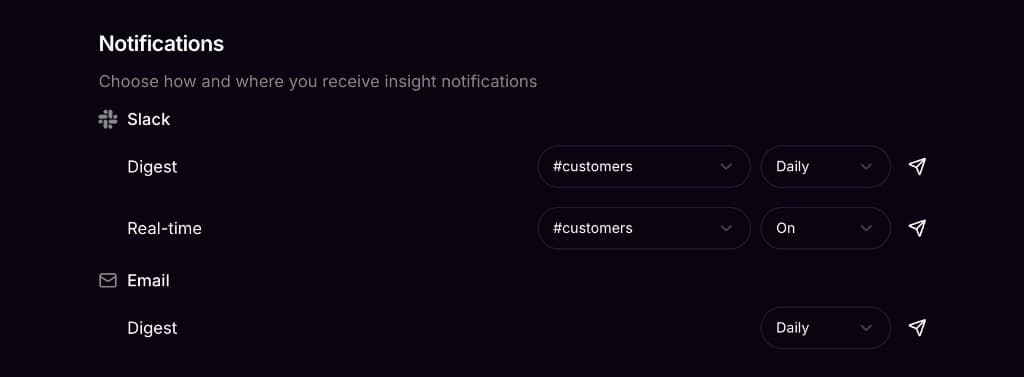
You can now choose how often you receive your digest. Pick a frequency that works for you so updates arrive daily, weekly, or monthly.
Phew! Those were an intense few weeks. We've been heads-down improving Klime across the board, with countless features refined, polished, and made more reliable. Here are three highlights:
Instantly take action on churn risks, growth spurts, reactivations, feature adoption, and more. Klime surfaces the insights that matter so you can focus on what to do next, not on digging through data.
Klime is available on the web and in Slack, giving you answers where your team needs them. Ask questions about your customers and metrics in natural language and get answers in seconds.
Connect Slack, email, and our SDK today. More analytics and CRM integrations are coming soon. Klime fits into your existing workflow without requiring you to change how you work.
The AI assistant just got a knowledge boost! It can now search through Klime's documentation to answer your questions about features, SDKs, and best practices directly in the chat.
Klime now supports Elixir. The new SDK is available on Hex.pm and works with any Phoenix or Plug-based application.
Install it with:
{:klime, "~> 1.0"}Check out the Elixir documentation to get started. Woohoo!
You can now configure real-time alerts to watch for specific events. When a customer triggers one of those events, Klime posts to your Slack channel instantly with the customer name (linked to their dashboard page) and event details.
Perfect for catching signups, upgrades, or any event worth celebrating or investigating right away.
You can now sign in with Google or create an account with email and password.
Previously, Klime only supported Slack authentication. Why? Good question. Now you have more options to access your account the way you prefer.
Team management also got an upgrade. Invite teammates by email and they can join using any authentication method.
Don't use Slack? You can now receive your daily digest via email.
The email digest includes the same customer health insights, activity charts, and analysis as the Slack version. Delivered straight to your inbox each morning.
Configure your digest preferences in Settings to choose between Slack, email, or both.
The Slack daily digest got a major upgrade.
Your morning digest now includes:
The digest now gives you a complete picture of customer health trends, not just yesterday's snapshot.
Klime now understands Slack threads.
When you ask follow-up questions in a thread, Klime remembers the context from earlier in the conversation. No need to repeat yourself, just keep the discussion going naturally.
Messages sent from Slack also now show a Slack badge in the web dashboard, so you can see where each conversation started.
Press CMD+K (or Ctrl+K) anywhere in the dashboard to instantly search for customers.
Jump directly to any customer's detail page without navigating through lists. The search matches on customer names and lets you quickly find who you're looking for.
Klime now supports User Mode for B2C products alongside the existing Group Mode for B2B.
When you set up Klime, you can now choose:
The entire dashboard, AI chat, and daily digests adapt to your chosen mode. User Mode customers see individual user health scores, activity timelines, and churn predictions instead of company-level metrics.
Track which features your customers are actually using with our new feature adoption analytics.
The dashboard now shows adoption rates across your customer base, helping you understand which features drive engagement and which might need attention. You can also see feature usage breakdowns on individual customer and user detail pages.
Your Slack daily digest now includes new customers and returning customers alongside your at-risk alerts.
This gives you a complete picture of customer activity each morning: who's churning, who's new, and who came back after being inactive.
You can now see at a glance whether Klime is receiving events from your product.
A new status indicator in the dashboard shows your data collection health. Click it to see details about when we last received events and troubleshoot any issues with your SDK integration.
Klime helps you retain customers by alerting you before they churn, explaining why with AI, and drafting the perfect outreach to keep them engaged.
We're just getting started. Follow along here as we ship.